MCP Integration: Technical Setup
Last updated: November 5, 2026
Implementation reference for customer engineering, IT and security teams.
Connect a compatible AI assistant to Mosaic through a remote Model Context Protocol (MCP) server. The integration uses Mosaic-issued OAuth credentials and applies existing Mosaic permissions to every tool request. Organization access must be enabled before users connect.
1. Connection Configuration
Setting | Value |
|---|---|
Standard MCP Endpoint |
|
Protocol | Remote MCP over Streamable HTTPS |
Authentication | Mosaic OAuth 2.1 authorization-code flow |
Tenant-Specific Deployments | Use the endpoint provided by Mosaic |
Prerequisites | Active Mosaic account; MCP Connector enabled for the organization; compatible client |
2. System Architecture
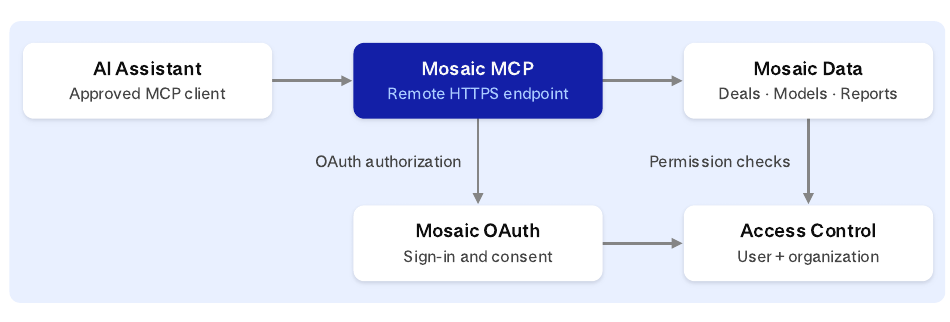
The AI client requests Mosaic capabilities on behalf of the signed-in user. OAuth authorization establishes the connection; Mosaic checks the user, organization entitlement and applicable record permissions when tools execute.
A connection does not bypass existing Mosaic access controls.
Standard endpoint: https://app-api.mosaic.pe/mcp
Dedicated deployments use the Mosaic-provided tenant endpoint.
3. Authorization Sequence
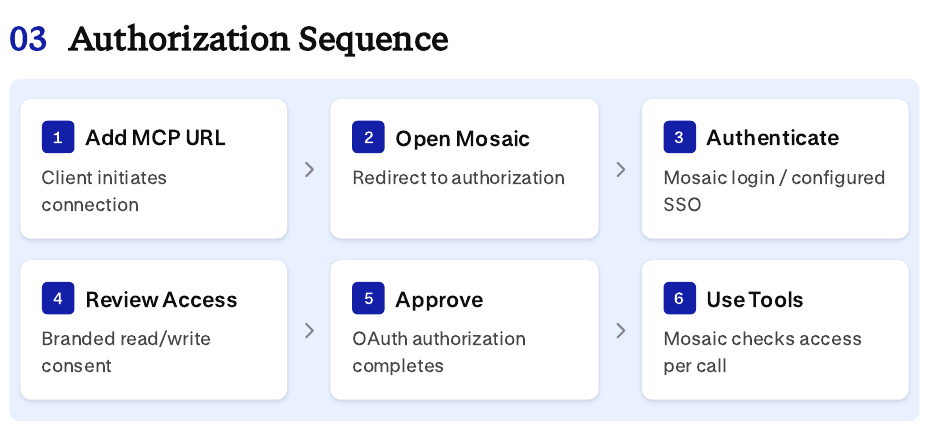
Credentials are issued by Mosaic OAuth; Mosaic permissions still govern every operation.
Mosaic operates the OAuth 2.1 authorization server using authorization code flow with PKCE (S256). A compatible client discovers authorization metadata, registers its redirect URI, and opens the Mosaic sign-in and consent flow.
The user signs in through their normal Mosaic authentication path, including MFA or SSO where configured.
Mosaic issues tokens to the connected client; the client does not receive the user's Mosaic web session token.
4. Engineer Setup Checklist
Confirm the AI client supports custom remote MCP servers and OAuth authorization.
Verify the customer organization has MCP Connector enabled and users have active Mosaic accounts.
Enter the correct MCP endpoint in the client's connector/server configuration.
Complete the Mosaic sign-in and consent flow; do not manually copy tokens into prompts.
Run a read-only validation such as listing accessible models or deals.
If permitted, test a controlled write against a noncritical record and verify permissions.
5. Capabilities and Permissions
Resource | Read / Retrieve | Create | Modify |
|---|---|---|---|
Models | List, ask questions, export | LBO / DCF | LBO / DCF; rename |
Deals | List, stages, documents metadata | Create deal | Update; assign or set primary model |
Analytics | List reports and values | Create report | Update report |
Deal Documents | List filenames / metadata | Not supported | Not supported |
Watchlists | List and retrieve | Not supported | Not supported |
Comp Sets | List and retrieve | Create comp sets | Add/remove companies from comp sets |
Important Boundaries
No delete tools are exposed. Watchlists are available for read-only retrieval.
Model creation and natural-language updates are supported for LBO and DCF models; other model types may be available for analysis.
Deal document tools return document names, not document contents.
6. Long-Running Builds and Exports
Creating or updating an LBO/DCF model starts an asynchronous task. The client should check task status until completed, failed, canceled or additional context is required.
For
needs_contextresults, provide a fuller brief and resubmit the same task rather than starting a duplicate model.After completion, retrieve the Mosaic model URL and an Excel download link.
Documents attached only to the AI conversation are not automatically available to Mosaic. Provide figures in the request or reference an eligible deal document already uploaded to Mosaic.
OAuth Token Lifecycle
Authorization codes are short-lived and single-use. Access tokens are scoped to the Mosaic MCP resource; refresh tokens rotate when used. Session expiry requires the user to authorize a new connection.
Credential | Lifetime | Behavior |
|---|---|---|
Authorization Request | 10 minutes | Pending request expires if not approved |
Authorization Code | 5 minutes | Single-use; bound to the client, callback and PKCE verifier |
Access Token | 60 minutes | Signed token validated for issuer, audience and expiry |
Refresh Token | 30 days (absolute) | Rotated on refresh; reuse invalidates the token family |
OAuth Discovery and Registration
The server publishes protected-resource and authorization-server metadata for compatible clients.
Clients use OAuth dynamic client registration and approved redirect URIs. Redirect URI validation and PKCE protect the authorization-code exchange.
The integration exposes a single OAuth scope; record-level rights remain governed by each user's Mosaic permissions.
7. Security and Data Governance
Area | Client-Facing Behavior |
|---|---|
Identity | Individual Mosaic sign-in; Mosaic-issued access and refresh tokens |
Authorization | User, organization entitlement and record-level access checked on tool calls |
Transport | HTTPS; request validation, host/origin protections and rate limiting |
Write Access | Read and write capabilities share the current connection; no read-only OAuth scope is offered |
Telemetry | Operational logs may contain truncated tool arguments; avoid unnecessary confidential content |
External AI Provider | Content received by the assistant is also governed by the customer's AI-provider terms and settings |
Connected AI Application | Data returned by MCP tools is processed under the connected AI provider's applicable terms and organization settings |
Transport and Validation | HTTPS, request validation, host protection, and rate limiting protect the remote endpoint |
Access Revocation and Session Termination
Disconnecting the integration in an AI client may prevent refresh but does not necessarily invalidate an already-issued access token.
A previously issued access token may remain valid for up to 60 minutes. Mosaic can disable a user or turn off MCP for an organization; those changes are checked on the next tool call.
Action | Expected Effect |
|---|---|
Disconnect in the AI client | Existing access token may remain usable until expiry (up to 60 minutes) |
Mosaic disables the user | Subsequent MCP tool calls are denied |
Mosaic disables MCP for the organization | Subsequent MCP tool calls are denied |
8. Troubleshooting
Symptom | First Check |
|---|---|
Cannot add server | Confirm the client supports remote MCP and use the exact endpoint |
Sign-in or consent fails | Confirm user access, organization SSO settings and browser session |
Access denied | Confirm the user's Mosaic permissions and organization MCP entitlement |
Model creation unavailable | Check the applicable Mosaic AI entitlement and model type |
Build needs more context | Supply missing source figures or an accessible Mosaic deal document |
For dedicated deployment endpoints, access provisioning or integration assistance, contact your Mosaic customer team.